
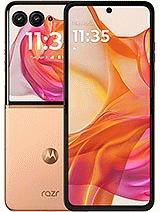
If you need to unlock a Motorola Razr 50 Ultra from home, you should call the network provider who has sold you the device, because it is the only way to obtain the SIM network unlock PIN for free. You must know that you need to fulfill the carrier's requirements, such as being the cell phone plan owner. At Movical.Net we know that sometimes it is complicated to fulfill these requirements, if your device is a second-hand phone or if you are in another country it will be a really complicated task.
The fastest method to obtain the unlocking is ordering in our website, when we introduce SIM cards from other carriers, the mobile phone prompts the SIM network unlock PIN, so you must order it on our website and you will receive perfectly explained unlock instructions in record time.
You should be careful when entering the unlock code, because your Motorola only has 5 attempts to enter the SIM unlock code. If the attempts are exhausted, your Razr 50 Ultra don’t indicate SIM network unlock PIN, and you will need an extra payment to unlock it. The unique solution will be to fix it, connecting with your computer.
Certainly not, our unlocks are official and forever, you can update Android without any problem.
You can use your Razr 50 Ultra with any SIM card from any carrier.
When a Razr 50 Ultra does not reject your new SIM card but does not allow you to make calls, it is most likely that the IMEI has been blacklisted. You need to contact with the carrier to solve it.
Some AT&T, Cricket, metroPCS and T-Mobile mobile phones in the USA do not require an unlock code, they are locked with an app pre-installed in the device called Device Unlock, this app is already installed by default in the device. You have to buy the unlock and we take care of the approving authorization to unlock it. Once approved you only press the Permanent Unlock button and it will be unlocked forever.
Normally a Motorola from Sprint, Verizon, Tracfone, Boost Mobile, StraightTalk or Simple Mobile from United States does not request the network unlock code, because these phones have a blocked firmware with the carrier. Our company solves this block and removes this restriction, but it has to be unlocked with a program on the PC and our technician will help you remotely.

 TUTORIAL VIDEO
1. - Turn on the handset on with a SIM card not accepted by the device (your new network operator)
2. - If the card has a PIN number, enter it and press OK.
3. - The device will prompt: “Network lock”, Now enter the code and press OK.
4. - Your cellphone will indicate: "Unlock successful", becoming permanently unlocked.
4b.- If the step 3 code was wrong, introduce secondary code, and press OK.
Device Unlock app method:
1. - Make sure you have an active data connection via mobile data or Wi-Fi.
2.- From the Application list, tap Device Unlock, the application is pre installed in your device.
3.- Choose the Permanent Unlock.
4.- Restart the device.
"Pude desbloquear mi teléfono de Cricket y ahora lo uso en México sin problema"
"Muy buen trabajo rápido y eficiente muy contenta con el trabajo"
"Muy bueno"
"Excelente cervicio"

© 2026 Grupo Redmobile S.L · Terms · Terms & Conditions · Cookies